
Fix zlibwapi.dll
Click the link and download the file below and save to your desktop:
The file is available for download from Dropbox.
(If you do not have access to Dropbox, you do not need to log in to download. Proceed by clicking on the Download buttons/links in the windows that opens).
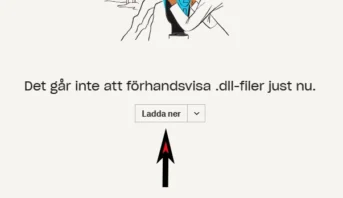
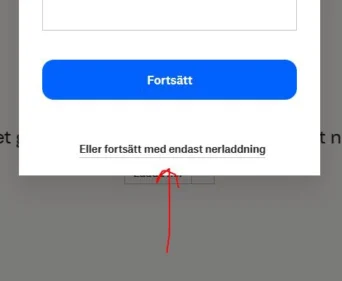
Then copy the saved file and paste it into the
c:\Program Files (x86)\Acuro\Bin\.
That’s all there is to it.
Problems downloading the file?
Here are some tips on how to solve it.
To download a .dll file that your computer is blocking, you can try the following steps.
Using a Different Browser or Browser Settings
-
**Change Browser Security Settings**:
– Open your browser settings (usually found in the menu under “Settings” or “Preferences”).
– Look for a section on security or privacy.
– Temporarily disable the feature that blocks potentially harmful downloads.
——
Or try it by
-
**Use a Different Browser**:
– Sometimes, using a different browser may allow you to download the file. For example, if you’re using Chrome, try e.g. Firefox or Edge.
Temporarily Disable Antivirus or Firewall
-
**Temporarily Disable Antivirus**:
– Open your antivirus program.
– Find the option to temporarily disable it (usually found in settings or right-clicking the system tray icon).
– Download the .dll file.
– Re-enable your antivirus as soon as the download is complete.
—
-
**Temporarily Disable Firewall**:
– Open Control Panel.
– Go to “System and Security” and then “Windows Defender Firewall”.
– Click “Turn Windows Defender Firewall on or off”.
– Temporarily disable the firewall.
– Download the .dll file.
– Re-enable the firewall immediately after the download is complete.


